
If you have a Facebook account or an Instagram profile, then you would have received emails and direct messages in the past from Meta. However, they’re not always from Meta!
Unfortunately, a lot of people tend to only check their emails and DM’s on their phones, and you can miss out on some very useful data doing this. When you view an email on your phone, you typically see the “given name” of the sender (which can be manipulated) and not the email address. The email address can help you understand more about the sender than anything else.
In the past, it would have been the poor spelling or grammar that gave it away, but now, with AI and grammar checks, this issue has essentially been overcome. It’s well worth checking the email address BEFORE clicking on any links in these emails.
When you’re on your laptop or iPad, you can see a lot more detail:

As you can see, the given name was very official-looking, as was the entire email, but the email address was an obscure Gmail address.
This email had a link to an apparent Facebook video on my Fan page that was using a song I apparently wasn’t allowed to use. I knew for a fact that I hadn’t used it because I don’t have ANY VIDEOS on my page that I have created myself with MUSIC. The only music I ever use is the one available through Facebook editing.
The Page ID is publicly available, so that didn’t frighten me either. It's all part and parcel of the transparency available on every public page on Facebook.
This was taken from their email to me:
Fanpage: "STOMP Social Media Training Ltd"
Page ID: 259696117507828
Infringed Content: Song "Someone You Loved"- 45 seconds used from 0:15 mark
Licensing Status: No authorization or valid license obtained
I continued to do my “homework” and established that the person “Joseph C. Shenker” does indeed exist. He’s currently the Senior Chair of Sullivan & Cromwell LLP, and is a renowned corporate lawyer known for his expertise in complex, high-stakes transactions. Not this kind of thing at all!
I also clarified that Cravath, Swaine & Moore LLP also exists and they also do Copyright Infringement – but the email address mentioned above is NOT accurate.
This was also my FINAL LEGAL NOTICE. If, for some reason, this arrived in my email and not in my spam, surely I would have seen the “previous” emails??
I was told I would expect a follow-up after 72 hours and there was none, so I saved this as an example of a rather terrifying but poor fraud.
Then I received this different email a couple of months before the above:
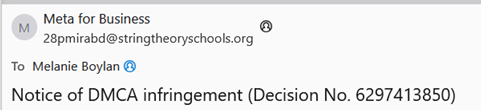
As you can see, the email was not from Meta
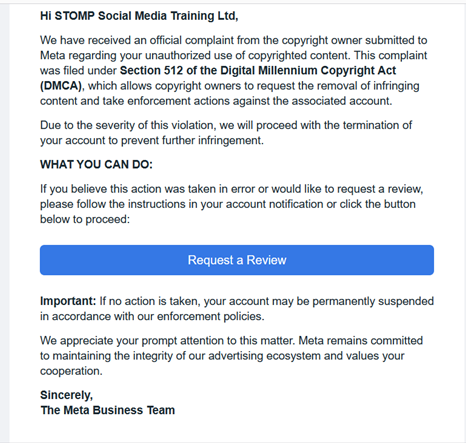
Naturally, I didn’t click the link! The wording, I assume, is verbatim to what Meta would send, and the “unsubscribe” button and the location address of Meta, etc., were all at the bottom of the email as you would expect, all correct as well. However, again, you can see the email is NOT Meta.
In some ways, it’s easier to identify Meta issues.
Please use 2FA for your personal and business profiles. You can also make sure to remove old admins and editors as soon as possible. Use a strong and unique password by using a password generator.
All of this information below is available from Facebook, where I TOOK IT FROM!
How to find your “Security Centre”
On Mobile App: Tap the menu icon (three lines)> Settings & Privacy > Settings > Accounts Center > Password andPasswordand security.
On Desktop: Click your profile picture (top right) > Settings & privacy > Settings > Accounts Center > Password and security.
Key Security Features Available:
Here are the essential steps to secure your page:
You may receive emails from the likes of security@mail.instagram.com, @mail.instagram.com or @support.instagram.com – which are all official Instagram email addresses, but you should still be very cautious because scammers can fake (spoof) emails from this address.
To verify if an email is legitimate, check your account's "Recent Emails" section in the app settings to see if the email is listed there. Never click any links in suspicious security emails; instead, log in directly to your account through the app to check for any alerts and take action.
To find recent emails sent by Instagram, go to your profile, tap the menu (three lines), you can do this on your laptop or phone, open Accounts Centre, select Password and security, and tap Recent emails. This section displays official emails from Instagram regarding security or logins from the last 14 days.
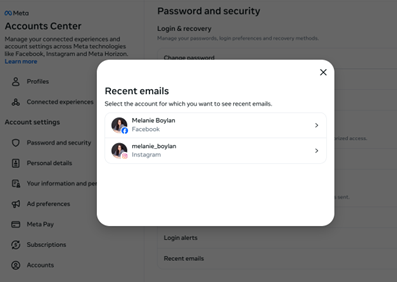
Legitimate security alerts will not require you to click a link in an email to secure your account.
It’s advisable that you then report the email as spam and block the sender's address to prevent any future messages.
If you’re still concerned about your account's security, then change your password and enable two-factor authentication immediately. I appreciate that using 2FA is fiddly, but at least you make it harder for them to steal your hard-earned audience by using it.
I would also make sure to not use your obvious business email to log into your accounts; this can be changed in Meta, again both on your phone and on a laptop/desktop.
On your phone: Navigate to Menu > Settings & Privacy > Settings > Accounts Centre> Personal details > Contact info, where you can add a new email, verify it, and then remove the old one.
On your laptop: To change your Meta account email, navigate to the Accounts Centre on the website or mobile app, go to "Personal details," select "Contact info," and add your new email address. You must verify the new email via a confirmation code before removing the old one.
Don’t despair completely yet! If it’s happened in the last 180 days, or six months, there may be a way of getting it back.
You’ll need to raise a ticket with Meta first and foremost. This is easily the hardest part to do, though! Depending on the type of account you had, the access you had previously and other more fiddly details, there are several routes. You may be able to through your Ads Account, you may have to ask a friend to report it for you, or you may have lost access to your Facebook account but still have access to your Instagram account or vice versa.
Over the years, I have managed to regain access to 3 accounts altogether – that’s it. It’s really hard to do, and frankly, it’s also very time-dependent. You can read about one of my fastest regains in this blog post. It took us 33 days but it nearly stressed the page owner and me out completely.
There is no magic answer or one thing that fits all, unfortunately, but if I can help in any way - please contact me.

Working with clients Nationwide from base in Mullingar.


